| 简介:
HTML5革命给Web开发者们带来许多超棒的JavaScript和HTML API,有些API已逐渐成为他们的好帮手。本文为大家总结了8个非常实用的HTML5 API。
之前,我们曾发布过 你应该知道的HTML5五大特性。下面,再向大家介绍一些非常实用的HTML5 JavaScript API。话说,JavaScript+CSS+HTML一直都是前端开发者的秘密武器,开发者利用它们可以开发出任何想要的东西,比如使用JavaScript访问硬件(摄像头、麦克风、游戏手柄、GPU)、访问文件系统和WebSocket。
1.Battery Status API
电池状态API,顾名思义,该API的主要用途是检查设备(笔记本电脑、手机、平板电脑)的电池状态。
var battery = navigator.battery || navigator.webkitBattery || navigator.mozBattery
console.log("Battery charging: ", battery.charging);
console.log("Battery level: ", battery.level);
console.log("Battery discharging time: ", battery.dischargingTime);
|
在经过一番研究后,向大家推荐battery.js库,专门用来检查设备的电池状态。
if(Battery.isSupported()) {
// Get the battery status
    var status = Battery.getStatus();
    console.log('Level: ' + Math.floor(status.level * 100) + '%');
// 30%
    console.log('Charging: ' + status.charging);
// true
    console.log('Time until charged: ' + status.chargingTime);
// 3600 (seconds) or Infinity
    console.log('Battery time left: ' + status.dischargingTime);
// 3600 (seconds) or Infinity

// Register a handler to get notified when battery status changes
    Battery.onUpdate = function(status) {
        console.log(status);
// {level, charging, chargingTime, dischargingTime}
    };
}
|
浏览器兼容情况(数字表示最低版本号,减号表示不兼容):
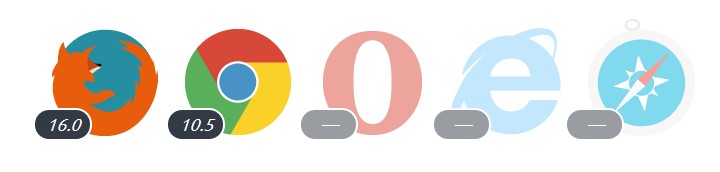
2.Gamepad API
游戏手柄API,该API允许你连接计算机和游戏控制台,使用它来玩网页游戏。
navigator.gamepads = navigator.webkitGamepads || navigator.MozGamepads;
var requestAnimationFrame = window.webkitRequestAnimationFrame ||
                            window.mozRequestAnimationFrame;
var cancelAnimationFrame = window.webkitCancelAnimationFrame ||
                           window.MozCancelAnimationFrame;
var controllers = {}; // Stash connected controllers.
var reqId = null;
function onConnected(e) {
    controllers[e.gamepad.index] = e.gamepad;
    runAnimation();
}
function onDisconnected(e) {
    delete controllers[e.gamepad.index];
    cancelAnimationFrame(reqId);
}
window.addEventListener('webkitgamepadconnected', onConnected, false);
window.addEventListener('webkitgamepaddisconnected', onDisconnected, false);
window.addEventListener('MozGamepadDisconnected', onDisconnected, false);
window.addEventListener('MozGamepadConnected', onConnected, false); |
以上代码源码,顺便向大家推荐gamepadjs这个库,它可以让你更方便地使用该库。
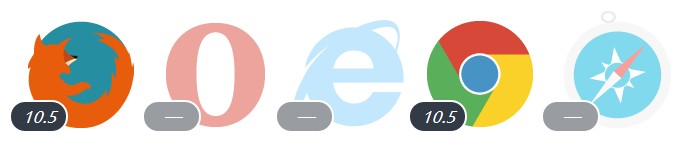
浏览器兼容情况:
3.Device Orientation API
设备定位API,该API允许你收集设备的方向和移动信息。此外,该API只在具备陀螺仪功能的设备上使用。

if (window.DeviceOrientationEvent) {
    window.addEventListener('deviceorientation', function(event) {
        var a = event.alpha,
            b = event.beta,
            g = event.gamma;
        console.log('Orientation - Alpha: ' + a + ', Beta: '+ b + ', Gamma: ' + g);
    }, false);
} else {
    console.log('This device does not support deviceorientation');
}
|
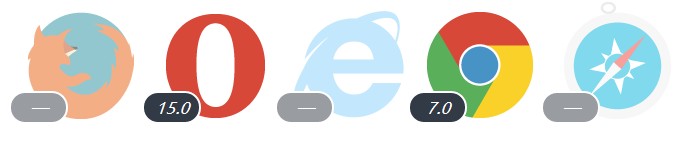
浏览器兼容情况:
4.Geolocation API
地理定位API,开发者使用该API可以请求用户的位置信息,在网页上分享自己的位置信息等。位置信息由纬度、经度坐标和一些其他元数据组成。
if (navigator.geolocation) {
    navigator.geolocation.getCurrentPosition(function(position) {
        var lat = position.coords.latitude,
            lon = position.coords.longitude;
        console.log('Geolocation - Latitude: '+ lat +', Longitude: '+ lon);
    });
}
else {
    console.log('Geolocation is not supported for this Browser/OS version yet.');
}
|
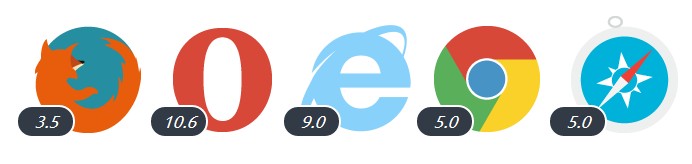
浏览器兼容情况:
5.Page Visibility API
页面可见度API,该API向开发者提供了一个监听事件,可以告诉开发者当前用户浏览页面或标签的状态变化
document.addEventListener('visibilitychange', function(e) {
    console.log('hidden:' + document.hidden,
              'state:' + document.visibilityState)
}, false);
|
运行良好;div 标签是一个很好的通用标签。不过,除了查看每个 div 标签的 id 属性之外,很难了解每个
div 标签代表文档的哪个部分。尽管您可能认为,只要命名合理,id 足够成为一个指标,但 id 属性是任意的。很多变体也被认为是同样有效的
id 。标签本身并没有指出内容类型,它只负责显示。
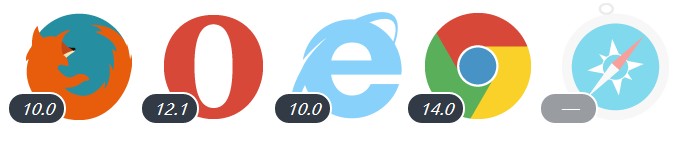
浏览器兼容情况:
6.Fullscreen API
全屏API,该API可以让开发人员进入到浏览器的全屏模式,用户在使用的时候可以随意启动和取消该模式。这个API特别适合游戏开发者:
// Find the right method, call on correct element
function launchFullScreen(element) {
  if(element.requestFullScreen) {
    element.requestFullScreen();
  } else if(element.mozRequestFullScreen) {
    element.mozRequestFullScreen();
  } else if(element.webkitRequestFullScreen) {
    element.webkitRequestFullScreen();
  }
}
// Launch fullscreen for browsers that support it!
launchFullScreen(document.documentElement); // the whole page
launchFullScreen(document.getElementById("videoElement")); // any individual ele |
7.getUserMedia API
这是个非常有趣的API,开发者使用该API可以访问多媒体设备,无需插件,比如笔记本的摄像头(要有用户权限)。与<video>和canvas元素一起使用,还可以在浏览器里面捕获许多漂亮的图片。
// Put event listeners into place
window.addEventListener("DOMContentLoaded", function() {
  // Grab elements, create settings, etc.
  var canvas = document.getElementById("canvas"),
    context = canvas.getContext("2d"),
    video = document.getElementById("video"),
    videoObj = { "video": true },
    errBack = function(error) {
      console.log("Video capture error: ", error.code);
    };

  // Put video listeners into place
  if(navigator.getUserMedia) { // Standard
    navigator.getUserMedia(videoObj, function(stream) {
      video.src = stream;
      video.play();
    }, errBack);
  } else if(navigator.webkitGetUserMedia) { // WebKit-prefixed
    navigator.webkitGetUserMedia(videoObj, function(stream){
      video.src = window.webkitURL.createObjectURL(stream);
      video.play();
    }, errBack);
  }
}, false);
|
8.Link Prefetching
链接预取API,该API提供页面预览功能,方便开发者改善用户体验。
<!-- full page -->
<link rel="prefetch" href="http://davidwalsh.name/css-enhancements-user-experience" />
<!-- just an image -->
<link rel="prefetch" href="http://davidwalsh.name/wp-content/themes/walshbook3/images/sprite.png" />
|
|