| 本文内容包括:
学习一种方法,包括使用数据池来实现数据驱动测试,以及在 Rational Functional
Tester 6.1 脚本上所必需的定制工作。自动化工程师可以使用许多种方法在 Functional Tester 中实现数据驱动测试。本文将探讨如何将逗号分隔文件(CSV)作为一种数据池导入到
Functional Tester 中。本文也将会示例一个脚本,其被修改用于从此 CSV 数据池中读取数据值。
介绍
数据驱动测试是功能自动化的最重要的方面之一。它是实现一个实际使用场景的最重要的技术,其通过提供唯一的自动化数据集,使得最终用户使用模式更加更加接近现实情况。在应用程序要求数百万条记录以进行完全覆盖测试的场景中,这种方式也是有用的。IBM?
Rational? Functional Tester 提供了一种框架,这种框架对于创建自动化数据驱动测试脚本是非常有用的。然而,自动化工程师被要求定制他们的脚本以满足他们的应用程序和特定需求。
回页首
什么是数据池?
一个数据池不过是一个测试数据集。它是一个相关数据记录集,在测试脚本回放期间为一个测试脚本中的变量提供数据值。
回页首
创建一个数据池
自动化工程师可以使用如下的过程,将一个 CSV 文件导入到 RFT 中。
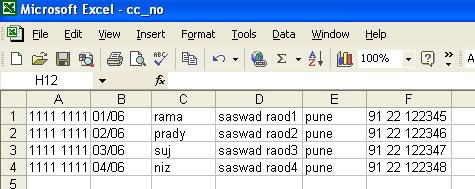
使用期望的测试数据集创建一个.CSV(逗号分隔值文件)。参见图1。
图1. CSV 文件示例
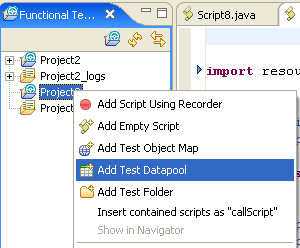
使用正确的数据存储库打开 Functional Tester。右健点击Project 并选择 Add Test Datapool。
图2. 增加一个测试数据池
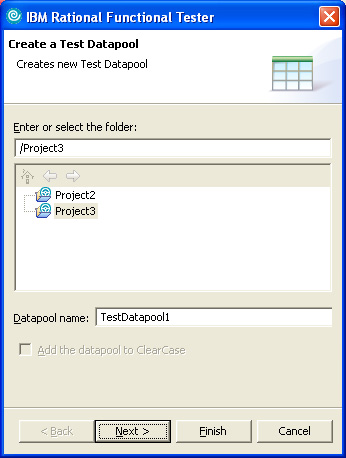
选择项目,并为数据池输入一个名字。点击 Next。
图3. 命名数据池
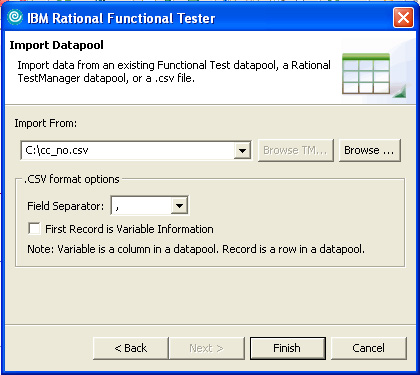
浏览到您想要导入的 CSV 文件,文件中包含了您想要的测试数据。点击 Finish。
图4. 完成导入
打开数据池进行验证。
图5. 验证数据池

使用导入的 CSV 文件作为一个数据池
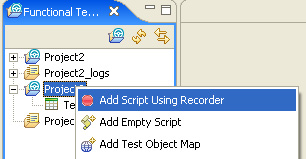
右健点击 Project,并选择 Add Script Using Recorder。
图6. 增加一个脚本
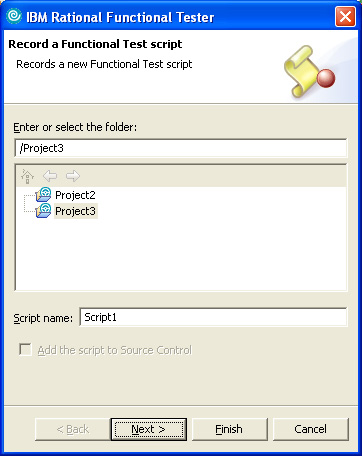
选择项目,并输入一个脚本名字。点击 Next。
图7. 命名脚本
使用必要的详细信息更新 Script Assets 弹出窗口。
图8. 选择脚本资产
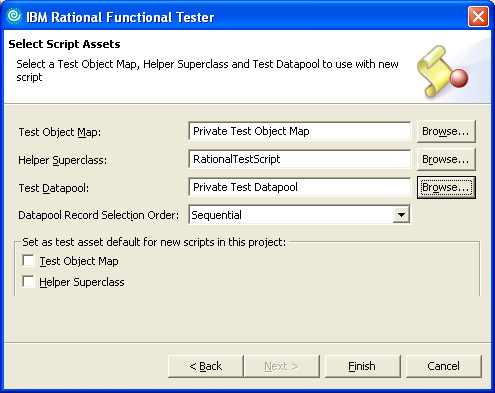
要选择测试数据集,点击 Browse,并选择新导入的 CSV 数据池。点击 OK。
图9. 选择数据池
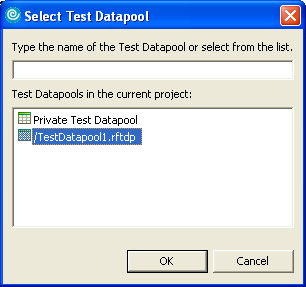
点击 Finish。
 打开应用程序。 打开应用程序。
图10. 应用程序
选择应用程序,并点击 OK。在本例中,我们正在使用 ClassicJavaB 应用程序范例。
图11. 选择应用程序
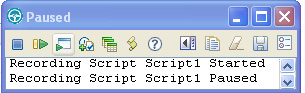
开始为您想要自动化的数据输入操作记录一个脚本。我们点击 Place Order 按钮,选择 New Customer单选按钮,然后点击
OK。在下一个屏幕上,应用程序打开一个 Place an order表单。我们在点击 Place order 按钮之前,输入Card
number、Expiration Date、Name、Street、City,State,zip 和 Phone。最后,我们点击
OK进行订单确认。
以上脚本记录将产生以下记录的脚本:
列表1. 记录的脚本
import resources.Script1Helper;
import com.rational.test.ft.*;
import com.rational.test.ft.object.interfaces.*;
import com.rational.test.ft.script.*;
import com.rational.test.ft.value.*;
import com.rational.test.ft.vp.*;
public class Script1 extends Script1Helper
{
public void testMain(Object[] args)
{
// Start Application
startApp("ClassicsJavaB");
// Click on Place Order
placeOrder().click();
// Click on New Customer radio button
newCustomer().click();
ok().click();
// Enter the values
cardNumberIncludeTheSpacesText().click(atPoint(43,10));
placeAnOrder().inputKeys("1111 1111 1111 1111");
expirationDateText().click(atPoint(33,9));
placeAnOrder().inputChars("01/06");
nameText().click(atPoint(95,6));
placeAnOrder().inputChars("rama");
streetText().click(atPoint(65,13));
placeAnOrder().inputChars("saswad raod");
cityStateZipText().click(atPoint(44,9));
placeAnOrder().inputChars("pune");
phoneText().click(atPoint(31,14));
placeAnOrder().inputChars("91 22 122345");
placeOrder().click();
//
ok().click();
// Frame: ClassicsCD
classicsJava(ANY,MAY_EXIT).close();
}
} |
这个记录的脚本对于重新输入静态记录是有用的,这些记录在脚本中得到确定的编码。对于数据驱动测试,自动化工程师被要求在执行脚本时提供唯一的记录。为了在运行时从数据池中提供必需的数据集,以上记录的脚本需要被修改。在下面现实的测试脚本是一个用于该目的的定制脚本。脚本的被修改部分用斜体进行了标记。
列表2. 定制脚本
import org.eclipse.hyades.execution.runtime.datapool.IDatapoolIterator;
import resources.Script1Helper;
import com.rational.test.ft.*;
import com.rational.test.ft.object.interfaces.*;
import com.rational.test.ft.script.*;
import com.rational.test.ft.value.*;
import com.rational.test.ft.vp.*;
public class Script1 extends Script1Helper
{
public void testMain(Object[] args)
{
// DatapoolScriptSupport provides methods for accessing rows
in an associated datapool.
DatapoolScriptSupport dpss = new DatapoolScriptSupport();
//Declare 'dp' as an object for IDatapool
(org.eclipse.hyades.execution.runtime.datapool.IDatapool)
org.eclipse.hyades.execution.runtime.datapool.IDatapool dp;
//Create a file object with complete TestDatapool file path
java.io.File dpfile = new java.io.File("D:\\Documents
and Settings\\
pradosht\\IBM\\rationalsdp6.0\\workspace\\Project3\\TestDatapool1.rftdp");
//Load the Testdatapool
dp = dpss.dpFactory().load(dpfile,true);
//Open the Test Datapool
IDatapoolIterator dpitr = dpss.dpFactory().open(dp,"");
//Initialize Test Datapool
dpitr.dpInitialize(dp);
//Starting application
startApp("ClassicsJavaB");
while(!dpitr.dpDone())
{
// Click on Place order
placeOrder().click();
// Click on New Customer
newCustomer().click();
ok().click();
//Get the current record & store it in record object
IDatapoolRecord dprec = dpitr.dpCurrent();
// Frame: Place an Order – Click on Card Number
cardNumberIncludeTheSpacesText().click();
//By accessing the corresponding cell in
the current record from excel sheet
placeAnOrder().inputKeys(dprec.getCell(0).getStringValue());
// Frame: Place an Order – Click on Date
expirationDateText().click();
//By accessing the corresponding cell in
the current record from excel sheet
placeAnOrder().inputChars(dprec.getCell(1).getStringValue());
// Frame: Place an Order – Click on Name
nameText().click();
//By accessing the corresponding cell in
the current record from excel sheet
placeAnOrder().inputChars(dprec.getCell(2).getStringValue());
// Frame: Place an Order – Click on Street
streetText().click();
//By accessing the corresponding cell in
the current record from excel sheet
placeAnOrder().inputChars(dprec.getCell(3).getStringValue());
// Frame: Place an Order – Click on CityStateZip
cityStateZipText().click();
//By accessing the corresponding cell in
the current record from excel sheet
placeAnOrder().inputChars(dprec.getCell(4).getStringValue());
// Frame: Place an Order – Click on Phone
phoneText().click();
//By accessing the corresponding cell in
the current record from excel sheet
placeAnOrder().inputChars(dprec.getCell(5).getStringValue());
// Frame: Place an Order
placeOrder2().click();
//Order Confirmation
ok2().click();
//Iterating to the Next Record
dpitr.dpNext();
}
// Close Application
classicsJava(ANY,MAY_EXIT).close();
}
}
|
在本文中,您学到了如何在 Rational Functional Tester 6.1 脚本中,使用数据池实现数据驱动测试和所要求的必要定制。我们希望您发现它对您的工作会有所帮助。
|
