实现一个RSS阅读器,通过你输入的RSS地址来获取RSS的信息列表和查看RSS文章中的详细内容。RSS阅读器是使用了WebClient类来获取网络上的RSS的信息,然后再转化为自己定义好的RSS实体类对象的列表,最后绑定到页面上。
(1) RSS实体类和RSS服务类
RssItem.cs
System.Net;
using
System.Text.RegularExpressions;
namespace
WindowsPhone.Helpers
{
///
<summary>
///
RSS对象类
///
</summary>
public
class
RssItem
{
///
<summary>
///
初始化一个RSS目录
///
</summary>
///
<param name="title">标题</param>
///
<param name="summary">内容</param>
///
<param name="publishedDate">发表事件</param>
///
<param name="url">文章地址</param>
public
RssItem(string
title, string
summary, string
publishedDate,
string url)
{
Title = title;
Summary = summary;
PublishedDate = publishedDate;
Url = url;
//解析html
PlainSummary = HttpUtility.HtmlDecode(Regex.Replace(summary,
"<[^>]+?>",
""));
}
//标题
public
string
Title { get;
set;
}
//内容
public
string
Summary { get;
set;
}
//发表时间
public
string
PublishedDate {
get; set;
}
//文章地址
public
string
Url { get;
set;
}
//解析的文本内容
public
string
PlainSummary {
get; set;
}
}
}
RssService.cs
System;
using
System.Collections.Generic;
using
System.IO;
using
System.Net;
using
System.ServiceModel.Syndication;
using
System.Xml;
namespace
WindowsPhone.Helpers
{
///
<summary>
///
获取网络RSS服务类
///
</summary>
public
static
class
RssService
{
///
<summary>
///
获取RSS目录列表
///
</summary>
///
<param name="rssFeed">RSS的网络地址</param>
///
<param name="onGetRssItemsCompleted">获取完成事件</param>
public
static
void
GetRssItems(string
rssFeed, Action<IEnumerable<RssItem>>
onGetRssItemsCompleted = null,
Action<Exception> onError = null,
Action onFinally = null)
{
WebClient webClient = new
WebClient();
//注册webClient读取完成事件
webClient.OpenReadCompleted
+= delegate(object
sender, OpenReadCompletedEventArgs e)
{
try
{
if
(e.Error != null)
{
if
(onError != null)
{
onError(e.Error);
}
return;
}
//将网络获取的信息转化成RSS实体类
List<RssItem>
rssItems = new
List<RssItem>();
Stream stream = e.Result;
XmlReader response = XmlReader.Create(stream);
SyndicationFeed feeds = SyndicationFeed.Load(response);
foreach
(SyndicationItem f in
feeds.Items)
{
RssItem rssItem = new
RssItem(f.Title.Text, f.Summary.Text, f.PublishDate.ToString(),
f.Links[0].Uri.AbsoluteUri);
rssItems.Add(rssItem);
}
//通知完成返回事件执行
if
(onGetRssItemsCompleted != null)
{
onGetRssItemsCompleted(rssItems);
}
}
finally
{
if
(onFinally !=
null)
{
onFinally();
}
}
};
webClient.OpenReadAsync(new
Uri(rssFeed));
}
}
}
(2) RSS页面展示
MainPage.xaml
phone:PhoneApplicationPage
x:Class="ReadRssItemsSample.MainPage"
xmlns="http://schemas.microsoft.com/winfx/2006/xaml/presentation"
xmlns:x="http://schemas.microsoft.com/winfx/2006/xaml"
xmlns:phone="clr-namespace:Microsoft.Phone.Controls;assembly=Microsoft.Phone"
xmlns:shell="clr-namespace:Microsoft.Phone.Shell;assembly=Microsoft.Phone"
xmlns:d="http://schemas.microsoft.com/expression/blend/2008"
xmlns:mc="http://schemas.openxmlformats.org/markup-compatibility/2006"
mc:Ignorable="d"
d:DesignWidth="480"
d:DesignHeight="768"
FontFamily="{StaticResource
PhoneFontFamilyNormal}"
FontSize="{StaticResource
PhoneFontSizeNormal}"
Foreground="{StaticResource
PhoneForegroundBrush}"
SupportedOrientations="Portrait"
Orientation="Portrait"
shell:SystemTray.IsVisible="True">
<Grid
x:Name="LayoutRoot"
Background="Transparent">
<Grid.RowDefinitions>
<RowDefinition
Height="Auto"/>
<RowDefinition
Height="*"/>
</Grid.RowDefinitions>
<StackPanel
x:Name="TitlePanel"
Grid.Row="0"
Margin="12,17,0,28">
<TextBlock
x:Name="ApplicationTitle"
Text="RSS阅读器"
Style="{StaticResource
PhoneTextNormalStyle}"/>
</StackPanel>
<Grid
x:Name="ContentPanel"
Grid.Row="1"
Margin="12,0,12,0">
<Grid.RowDefinitions>
<RowDefinition
Height="Auto"
/>
<RowDefinition
Height="*"/>
</Grid.RowDefinitions>
<TextBlock
FontSize="30"
Grid.Row="1"
Height="49"
HorizontalAlignment="Left"
Margin="0,6,0,0"
Name="textBlock1"
Text="RSS地址"
VerticalAlignment="Top"
Width="116"
/>
<TextBox
Grid.Row="1"
Height="72"
HorizontalAlignment="Left"
Margin="107,0,0,0"
Name="rssURL"
Text="http://www.cnblogs.com/rss"
VerticalAlignment="Top"
Width="349"
/>
<Button
Content="加载
RSS" Click="Button_Click"
Margin="-6,72,6,552"
Grid.Row="1"
/>
<ListBox
x:Name="listbox"
Grid.Row="1"
SelectionChanged="OnSelectionChanged"
Margin="0,150,6,-11">
<ListBox.ItemTemplate
>
<DataTemplate>
<Grid>
<Grid.RowDefinitions>
<RowDefinition
Height="Auto"
/>
<RowDefinition
Height="Auto"
/>
<RowDefinition
Height="60"
/>
</Grid.RowDefinitions>
<TextBlock
Grid.Row="0"
Text="{Binding
Title}"
Foreground="Blue"
/>
<TextBlock
Grid.Row="1"
Text="{Binding
PublishedDate}"
Foreground="Green"
/>
<TextBlock
Grid.Row="2"
TextWrapping="Wrap"
Text="{Binding
PlainSummary}"
/>
</Grid>
</DataTemplate>
</ListBox.ItemTemplate>
</ListBox>
</Grid>
</Grid>
</phone:PhoneApplicationPage
>
MainPage.xaml.cs
using
System.Windows;
using
System.Windows.Controls;
using
Microsoft.Phone.Controls;
using
WindowsPhone.Helpers;
namespace
ReadRssItemsSample
{
public
partial
class
MainPage : PhoneApplicationPage
{
private
string
WindowsPhoneBlogPosts = "";
public
MainPage()
{
InitializeComponent();
}
private
void
Button_Click(object
sender, RoutedEventArgs e)
{
if
(rssURL.Text !=
"")
{
WindowsPhoneBlogPosts = rssURL.Text;
}
else
{
MessageBox.Show("请输入RSS地址!");
return;
}
//加载RSS列表
RssService.GetRssItems(
WindowsPhoneBlogPosts,
(items) => { listbox.ItemsSource = items; },
(exception) => { MessageBox.Show(exception.Message);
},
null
);
}
//查看文章的详细内容
private
void
OnSelectionChanged(object
sender, SelectionChangedEventArgs e)
{
if
(listbox.SelectedItem == null)
return;
var template = (RssItem)listbox.SelectedItem;
MessageBox.Show(template.PlainSummary);
listbox.SelectedItem = null;
}
}
}
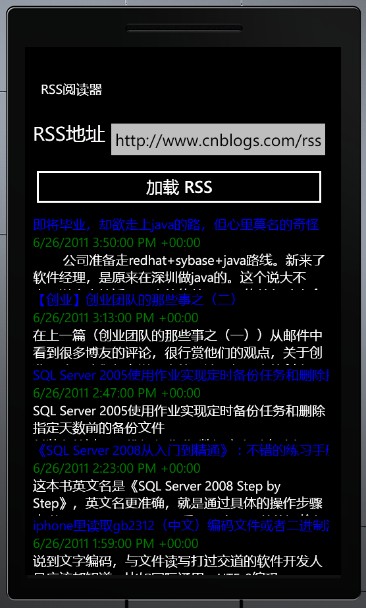
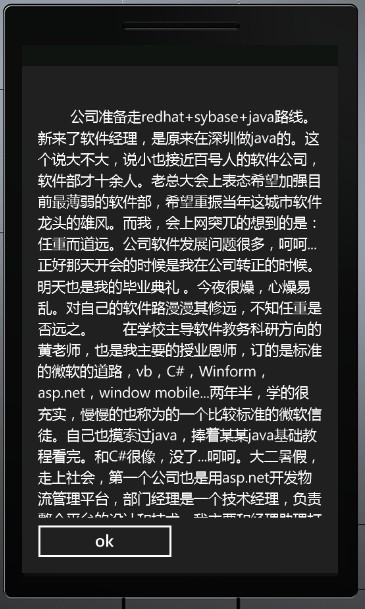
(3)程序运行的效果如下
|